


DuoMix
4.5556.00 Reviews
App Specs
- Version
- 7.20
- Updated On
- License
- Free
- Downloads
- 5,000,000+
- Developer
- MUSIC HERO
- Categories
- Music
- Platform
- Android, iOS
Screenshots
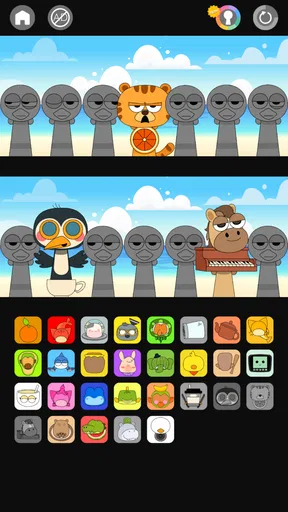
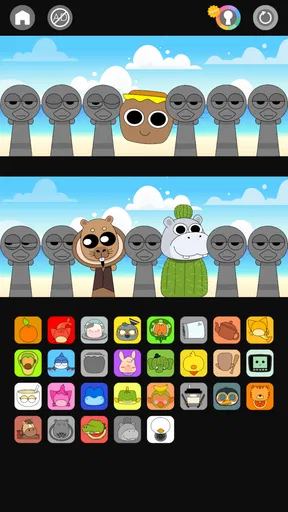
 Analysis by AppCompare
I’d judge DuoMix first by what it costs to get started: it is free to download, with in-app purchases listed at $4.99 per item. That makes it easy to try without committing money up front, though I would not treat the free entry point as proof that every option is available at no cost. The Teen content rating is also worth noting if you are choosing music games for a younger player.
What free access means in practice
For me, a free music game is most useful when I can open it for a short session, experiment, and decide whether its particular style suits me before paying for anything. DuoMix is presented as an interactive music-making game rather than a full professional production studio, so I would approach it as a playful way to explore sounds, not as a replacement for dedicated recording software or a traditional DJ setup.
The purchase detail gives a useful boundary: individual in-app items are listed at $4.99 each. If you are considering spending, I would first try the free experience and ask whether the extra item would genuinely change how you play. A single purchase can be reasonable when it adds something you expect to use often; it is less compelling if you are only curious for one evening. I would keep that distinction in mind rather than assuming a purchase is needed to enjoy the core idea.
A music game with a narrower, clearer purpose
The appeal here is the act of making and arranging spooky-sounding beats in a playful setting. That gives DuoMix a different job from a conventional rhythm game, where the main challenge is usually following notes accurately, and from a music-editing app, where the aim is to build a polished track with detailed controls. I would choose this game when I want to experiment without turning a casual session into a technical project.
That difference also defines its limits. If you want to practise a particular instrument, learn formal music theory, or export a finished track for a serious project, a dedicated learning tool or audio workstation is likely a better fit. If you mainly want a quick creative diversion and enjoy spooky musical themes, the game’s focused premise is more of a strength than a restriction.
Where it fits into an ordinary day
I can imagine opening it during a quiet break, trying a few combinations, then putting it away without needing to plan a long session. It could also work as a low-pressure activity with a friend: take turns making choices, listen to how the mood shifts, and compare which arrangement feels most fun. The useful part of that approach is treating the result as a shared little experiment rather than expecting either player to produce a polished composition.
For a more satisfying session, I would give myself a small prompt before starting: make something eerie but playful, or try to create a beat that changes mood. A simple goal makes experimentation feel deliberate without demanding musical training. I would also listen to a combination from the beginning before deciding it is finished; a sound that seems promising in isolation may feel too busy once the other parts are in place. That is a practical way to make the creative process more rewarding, even when the session is short.
Worth Reading Before You Choose

EA SPORTS FC Mobile 26 Is a Bigger Football Game, but It Takes Time

Flipboard Shows What News Apps Must Do Beyond the Feed

Switching to Android Auto Means Rethinking Your Driving Routine

Google Calendar Makes a Crowded Week Easier to Manage

Ludo King Makes the Most of the Minutes Between Plans

Baby Panda World Brings Quick Play to Modern Phones, but Its Game Library Feels Busy
Your Personal DJ Companion
DuoMix is like having a DJ buddy in your pocket. The app lets you mix tracks effortlessly, offering a plethora of features that even someone new to mixing can navigate. With its intuitive interface, you’ll feel like a pro in no time. Seriously, I was mixing tracks like a mad scientist within minutes of downloading it.
Mixing Made Easy
The best part? You don’t need any fancy equipment to get started. Just your smartphone and a passion for music. The app allows you to access your music library and Spotify playlists seamlessly. You can drag and drop tracks into the mixer, adjust tempo, and add effects like a boss. It’s all about making the music your own.
Features That Keep You Hooked
What really impressed me about the game is its range of features designed to enhance your mixing experience. Here’s a quick rundown:
- Auto-Mix: Perfect for those moments when you just want to sit back and enjoy. Let the app do the hard work while you take the credit.
- Beat Matching: Ensures that your tracks transition smoothly, maintaining the vibe without missing a beat.
- Looping & Sampling: Get creative with loops and samples to add that unique flair to your mixes.
- Effects & Filters: Dive into an array of effects to add depth and texture to your sound. Whether you’re into reverb or phaser, the choice is yours.
Getting more from a short session
One way I would approach the listed tools is to change one thing at a time. Start with a basic arrangement, then try a loop or sample, and only after that experiment with an effect. When several changes happen together, it becomes harder to tell which one improved the sound. This small habit makes the process easier to follow and helps a beginner build confidence without needing to know technical terms first.
Auto-Mix also points to a useful choice in how to play: let the game handle more of the work when you want a relaxed listen, or take a more hands-on approach when you want to test ideas. Neither style is automatically better. If you are playing around other people, an automatic option may keep things moving; if you are alone and curious, making deliberate changes gives you more room to learn what you like.
Community & Collaboration
Another cool aspect is the community feature. You can share your mixes, get feedback, and even collaborate with other users. It’s like a social network for music lovers. I’ve already connected with a few other users, and it’s been a blast exchanging ideas and tracks.
Sharing without losing the fun
For me, sharing works best when feedback stays specific: ask whether a transition feels smooth or whether a particular sound suits the mood, rather than simply asking if a mix is good. That turns the social side into a practical source of ideas. Collaboration can also be a reason to return when you have already explored the basic tools on your own, since another person may approach the same musical material differently.
There is a trade-off, though: a community element is most valuable if you enjoy showing unfinished work and responding to other people. If you prefer to keep creative experiments private, or you do not want a social layer around a game, that feature may matter less to you. I would choose based on whether exchanging feedback sounds motivating, not because sharing is required to make a music game worthwhile.
Why DuoMix Stands Out
What makes this music game stand out is its user-friendly design and robust functionality. It’s not just for the pros; it’s for everyone who loves music. You don’t feel overwhelmed by technical jargon or complicated settings. Instead, you’re encouraged to explore and have fun.
Who is likely to get the most value?
I would recommend trying it if you like playful sound-making, enjoy spooky themes, or want a casual activity that gives you more creative choice than simply tapping along to a song. It may be especially appealing to someone who has wondered what mixing involves but has been put off by specialist equipment or software. The game’s approachable framing makes experimentation feel less intimidating, while its creative focus gives a music fan something to do beyond listening.
I would be more cautious if you need precise control for live DJ work, want a structured course, or expect a finished song suitable for release. Those are different goals, and a more specialised tool is built around them. Likewise, someone who dislikes spooky presentation or prefers straightforward music challenges may find the theme and creative format less appealing. The best reason to choose this is interest in making and testing musical combinations, not a promise that it will replace every other music app.
Availability and practical expectations
The game is made by MUSIC HERO and is listed in the music category. It has a 4.5 average from around 71,000 ratings, with more than 5 million installs. Those figures suggest that it has reached a substantial audience, but they cannot tell you whether its particular style will suit your tastes; I would use them as context, then decide based on the game’s creative premise and your own interest.
It was released on November 29, 2024, and the current version is 7.10. The minimum operating-system requirement is 7.0, so it is sensible to check that your device meets that baseline before installing. Its Teen age rating may also help families decide whether the content is appropriate. Since the game is free to start and purchases are optional items, I would try it first and only consider spending once I know which parts I actually enjoy.
Wrapping It Up
All in all, the app has quickly become my go-to app for all things mixing. Whether I’m prepping for a party or just playing around with sounds, it’s got my back. If you’re looking to bring your music experience to the next level, give it a shot. Who knows, you might just discover your inner DJ!
Ready to dive into the world of mixing? You can download the game from the App Store or Google Play and start creating your musical masterpiece today!
My buy-or-skip verdict
I would try it for free if the idea of making spooky beats sounds enjoyable, especially if I wanted a relaxed creative break rather than a demanding music lesson. I would skip the purchase unless I had already found an item I knew I wanted; the listed $4.99 price per item makes that a personal value decision, not an automatic part of getting started. For a prospective player, that is the clearest way to judge it: test whether its playful mixing approach fits your taste, then decide whether anything paid adds enough to your own sessions.
Pros
- Intuitive user interface that's easy to navigate.
- Wide variety of music genres to explore.
- High-quality audio streaming without interruptions.
- Customizable playlists for personalized listening.
- Offline mode available for on-the-go access.
Cons
- Limited free features compared to premium.
- Occasional ads interrupt the listening experience.
- Some tracks may have regional restrictions.
- Requires a stable internet connection for streaming.
- User interface lacks advanced search options.
FAQs for DuoMix
What is DuoMix, and what are its main features?
DuoMix is a versatile music app designed for both Android and iOS, offering users an intuitive platform to mix and create music. Its main features include a wide range of sound effects, a built-in library of loops and samples, real-time mixing capabilities, and seamless integration with other music apps. Whether you're a professional DJ or a music enthusiast, DuoMix caters to all skill levels.
Is DuoMix free to use, or does it require a subscription?
DuoMix offers a free version with basic features, allowing users to explore the app without any initial cost. However, for access to premium features like advanced sound effects, exclusive loops, and an ad-free experience, a subscription is required. Users can choose from monthly or yearly plans depending on their needs.
How user-friendly is DuoMix for beginners?
DuoMix is designed with beginners in mind, featuring a user-friendly interface that's easy to navigate. The app includes tutorials and helpful tips to guide new users through the mixing process, ensuring that even those with no prior experience can create impressive music tracks. Its learning curve is gentle, making it accessible to all skill levels.
Does DuoMix support collaboration with other users?
Yes, DuoMix supports collaboration, allowing users to connect and work on projects together. The app features a cloud-based system where users can share their tracks, receive feedback, and collaborate on mixes in real-time. This fosters a community-driven environment where creativity and innovation thrive.
What are the device requirements for installing DuoMix?
DuoMix is compatible with both Android and iOS devices. For Android, it requires version 7.0 or higher, while iOS users need version 11.0 or later. The app is optimized for both smartphones and tablets, ensuring a smooth performance across different devices. It's important to have sufficient storage space for optimal functionality.


